Taking a Leap into Time Travel
My Journey with PostgreSQL and TimeScaleDB as a .NET Core Developer
So there I was, stuck in a world where dealing with time-series data was as painful as a paper cut on your thumb - irritating, uncomfortable, and surprisingly painful. Then PostgreSQL and TimeScaleDB waltzed into my life changing my attitude toward managing time series data forever.
The "Why" Behind the Switch
Picture this: You're a . NET Core developer knee-deep in SQL Server, trying to make sense of time-series data. Not an easy thing. Then, out of the blue PostgreSQL shows up flexing its advanced features. TimeScaleDB with optimized time series data management. Intrigued? I was.
I mean, who wouldn't be? TimeScaleDB not only rolls out the red carpet for time series data, it practically treats it like royalty. Combine that with the robustness of PostgreSQL, and you have a winning team. But before we could run with it, we had to walk. A long walk required us to redo our database schema. PostgreSQL's naming conventions aren't as critical for TimescaleDB. But refactoring is a golden rule as you launch off the tar mac.
When Things Get Case-Sensitive
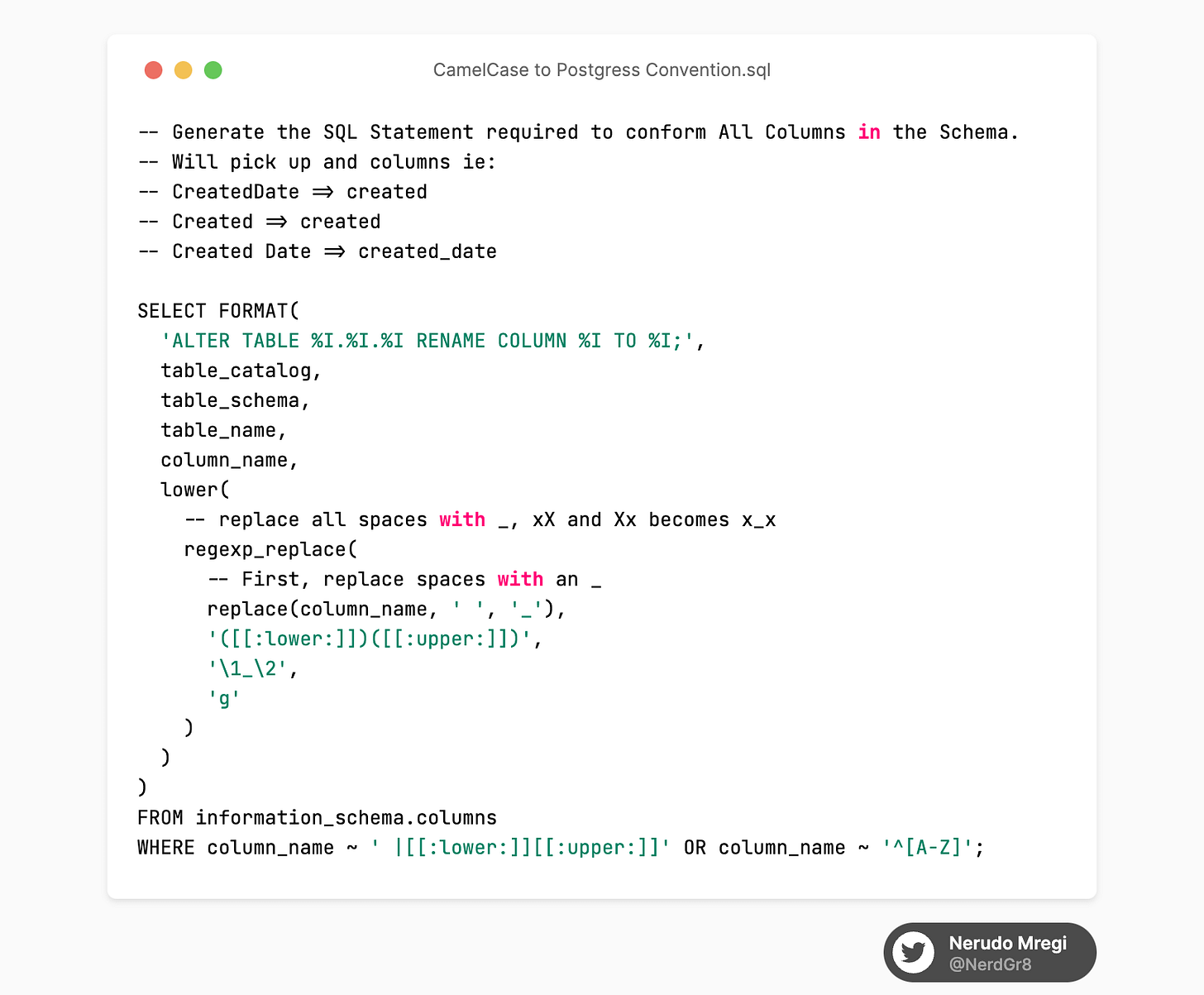
We all know that SQL Server doesn't really care about casing, but PostgreSQL? Oh boy, it's as picky as a toddler refusing to eat anything but dinosaur-shaped chicken nuggets. You can tell I’m now a dad, (it's the jokes). EFCore allows for several naming conventions the default of which as you might have it will be camel casing. It's best to stick to lowercase with underscore hyphenation to keep within the Postgres Naming conventions. There are other reasons too which we won’t get into in this post. Not sure where to start? Then check out this handy PostgreSQL script [gist]:
The Trials and Tribulations of Transition
Here's where our journey takes a bit of a twist. Transitioning from SQL Server to PostgreSQL isn't a hop, skip, and jump. It's more like navigating a minefield with blindfolds on. But fear not, fellow explorer, I've been through the treacherous path and lived to tell the tale.
Plot Twist 1: The Connection String
Your good ol' SQL Server connection string isn't going to cut it anymore. You'll need to suit up PostgreSQL style:
Host=myserver;Database=mydb;Username=myuser;Password=mypassword;Plot Twist 2: Meet Npgsql
You'll need to trade your SQL Server provider for Npgsql in the EF Core provider market. Just a small edit in your Startup.cs file:
services.AddDbContext<YourContext>(options =>
options.UseNpgsql(Configuration.GetConnectionString("DefaultConnection")));
As mentioned earlier (If you have been reading). You can do this without changing the schema. But if you should, make the following change to enforce the naming convention UseSnakeCaseNamingConvention
services.AddDbContext<YourContext>(options =>
options.UseNpgsql(Configuration.GetConnectionString("DefaultConnection").UseSnakeCaseNamingConvention()
));
Plot Twist 3: New Migrations, New Adventures
SQL Server migrations might've been your loyal companion till now, but it's time to part ways. PostgreSQL demands its own set of migrations. But hey, new adventures, right?
Open up your terminal and Run Migrations:
dotnet ef migrations add "Hey Postgres" #Offcourse name them correctly It’s time to scale the time (TimescaleDB)
Now that we've learned how to adjust to PostgreSQL's naming conventions and got acquainted with Npgsql, let's jump into the next exciting part of our adventure: setting up TimeScaleDB on our existing PostgreSQL instance.
Well, it's like hosting a house party - you've got the place (PostgreSQL), and now you just need to invite the life of the party (TimeScaleDB).
If you want a docker image with the timescale extension setup already, sure here you go [Link]!
Quick timescale setup steps:
Start by downloading the TimeScaleDB extension.
Once you've got that, make sure to check your PostgreSQL version - TimeScaleDB and PostgreSQL versions need to be compatible.
If all's well, it's time to party!
Open your PostgreSQL shell, It's as simple as:
CREATE EXTENSION IF NOT EXISTS timescaledb CASCADE;.This command tells PostgreSQL, 'Hey, let's get this party started and bring in the TimeScaleDB features!'
Once TimeScaleDB is set up, you can start converting your existing tables into hypertables, or if you're creating a new one, make it a hypertable from the get-go. Hypertables are where the TimeScaleDB magic happens. They're designed for high performance on time-series data, so you're basically putting your data on steroids.
That's it, folks! You've got TimeScaleDB ready and raring to go in your PostgreSQL database. Next, we'll dive into hypertables and how to put them to work, so stick around for the fun!"
If this was fun, give it a share and come on over to twitter @NerdGr8 and say hi!
First published on Substack.